Navigation
Install the app
How to install the app on iOS
Follow along with the video below to see how to install our site as a web app on your home screen.
Note: This feature may not be available in some browsers.
More options
Style variation

You are using an out of date browser. It may not display this or other websites correctly.
You should upgrade or use an alternative browser.
You should upgrade or use an alternative browser.
Update News
- Thread starter Ice-Mark
- Start date
Welcome! You have been invited by Gand-Alf to join our community. Please click here to register.


That was the PV4 update at the AH.


I also had some messages about the onboard book, but after I deleted them, they didn't come back for now.
Oh, I always get exactly three messages that I delete after every start...
I had my ST VZ at Cupra today, among other things, because of the flickering ambient lighting.
The technician said that this would be fixed with a new software update.
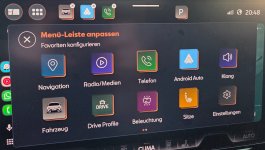
It also seems like there is new software installed. I now have Android Auto next to the parking assist, the individual driving profile can now be adjusted via a small gear directly on the icon... Etc...
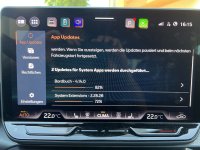
Unfortunately, I no longer have the option for software updates in the settings... Or I'm just too stupid:
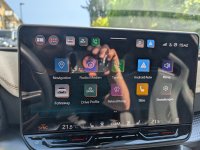
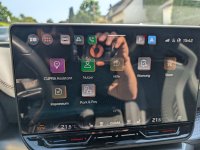
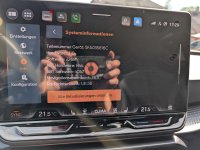
but when I access the store, the display tells me that I need to do updates first xD
The technician said that this would be fixed with a new software update.
It also seems like there is new software installed. I now have Android Auto next to the parking assist, the individual driving profile can now be adjusted via a small gear directly on the icon... Etc...
Unfortunately, I no longer have the option for software updates in the settings... Or I'm just too stupid:
but when I access the store, the display tells me that I need to do updates first xD
Last edited:



Angefixt
Forenfan ★★★
Same here.Just came in fresh today
Yesterday I had another update.

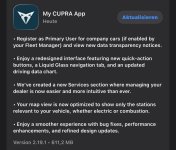
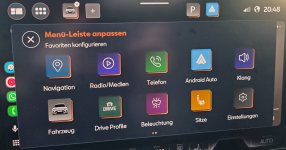
LOL, I've been thinking for weeks, "Why isn't the AA icon statically on the right side, where there's still space, considering how often you need it..."Because if you had Android Auto on the left quick access bar before, it was simply hidden on the right.
It was probably because after the update at the workshop, the left quick access bar was reset.

cappuccino
Stammuser ★★
Nothing for me.Just came in fresh for me today...

Timm987
Kennt sich aus ★
Same here.Just came in fresh for me today...
AndreCupra
Ist öfter hier
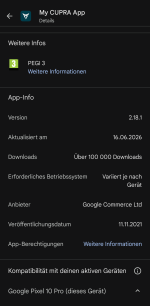
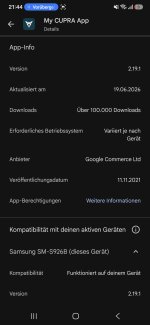
I believe only for iOS, not for Android. My version is still 2.18.1 on Android.
What new features are included?
What new features are included?
Timm987
Kennt sich aus ★
I received version 2.19.1 for Android through the Play Store.
AndreCupra
Ist öfter hier

Timm987
Kennt sich aus ★
AndreCupra
Ist öfter hier
Then the only reason can be that I come from Austria....  I also can't find the APK anywhere on the internet for download with version 2.19.1.
That's not the issue. I'm also not seeing the version (yet). The updates are usually rolled out to users in waves, which is actually normal.
Similar threads
- Replies
- 2
- Views
- 1K
- Replies
- 7
- Views
- 3K
- Replies
- 2
- Views
- 3K
* = Advertisement
Links marked with an asterisk (*) are affiliate links. If you click on one of these links and make a purchase, we receive a commission from the respective online shop or provider. This does not affect the price you pay.