12 GB large update for Terramar control units

Yes, please keep us updated here. I have two issues with the update: first, my user account is not syncing, and second, the issue with the onboard book...
 
I still have the problem with synchronizing the user even after a year. The major update has been installed twice now (version 1 & 4). The latest version of the PV4 will be installed next Monday. Before that, I will remove the car from the ID Cupra, as well as from the app. The app will be uninstalled and the car will be reset to factory settings. Let's see if they can solve the known problem then.
 
Oh man... Then please give us some information here about what you found out!
 
I had the major control unit update done at my dealership on my Terramar e-Hybrid, which I purchased in June 25. Dropped it off in the morning, picked it up in the afternoon. So far, everything looks good. The service advisor mentioned that, based on varying experiences in the past, the update software has since shed its "teething problems."
Status after 2 weeks: No problems :)
 
Last edited:
Well.... I wouldn't entirely agree with that. Since then, I have received 1-3 messages about the downloaded onboard Manual* every time I start the vehicle. And the message telling me to turn on Battery Care cannot be removed either.
 
Last edited:
After the app update a couple weeks ago I also received the 'owner's Manual*' message. This hasn't be a part of the PV4 update.
 
My car has been back in the workshop since Monday due to the major update
 
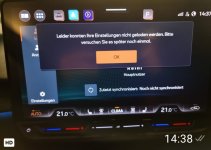
According to the profile window in the car, my profile has not been synchronized since August of last year; when I try to initiate it, an error always occurs... As long as my functions work through the app, it's not that bad, but it's still annoying.
 
According to the profile window in the car, my profile has not been synchronized since August of last year; when I try to initiate it, an error always occurs... As long as my functions work through the app, it's not that bad, but it's still annoying.
There are indeed a few with the error 😤
 
Today I got my Terramar back. It had been in the workshop for 3 days and there were several attempts to fix the errors by reinstalling the major update version ???. There was a lot of email correspondence with Cupra and according to the last message, the TPI will be reset until they find a solution 😤. Now I have set everything up again and will wait and see. However, I have also indicated that my patience is running out and if the threat doesn't help, I will contact my lawyer and then Cupra should send a letter, and then we will see.............

PS: If anyone else has the problem that the user cannot be synchronized and someone has managed to do it, please contact me - THANK YOU
 

Attachments

  • Synchronisieren nicht möglich.jpg
    Synchronisieren nicht möglich.jpg
    62.9 KB · Views: 23
Hello, I don't want to offend your workshop, but did they follow the instructions as described on the Cupra website with the ignition off, everything off, locking it, maybe even connecting an external charger, and blah blah, or am I totally wrong? 🤷‍♂️
 
Hello, I don't want to offend your workshop, but did they follow the instructions as described on the Cupra website with the ignition off, everything off, locking it, maybe even connecting an external charger, and so on, or am I totally wrong? 🤷‍♂️
I think you're mistaken. My workshop, which is very diligent, follows every step that Cupra prescribes. What is the point of turning it off, locking it, and connecting a charger, etc.? 🤔 I don't have a battery problem; rather, I can't synchronize under the "User" menu. As a result, some settings are not permanently saved, and the car cannot receive OTA updates. Best regards, Reini
 
As the main user, can you log in, has it at least loaded your settings once, or does it fail at that point?

Edit: In the Leon subforum, there is also a Thema There are no solutions for that yet.
 
Last edited:
Since yesterday, I suddenly no longer have notifications at startup that the onboard Manual* has been downloaded. I will continue to monitor this.
However, the error with the message during driving that the rollaway protection is activated and blah blah blah, and that the vehicle switches to N occurred again yesterday. So that was not fixed by the big super-duper update.
Unfortunately, the window with the message disappears again after a few seconds. Unfortunately, I can't get my phone out quickly enough to take a photo.
 
Last edited:
As the main user, can you log in? Has it at least loaded your settings once, or does it fail at that point?
Everything works, including the app functions like the horn, etc., which work perfectly.
 
Right, same here. I can consider myself lucky that mine accepted the update.
 
So I just deleted my profile yesterday and registered again. I was really glad that I didn't have any notifications this morning.... But as I read here, that wasn't the reason 🙈 I hope they finally managed to fix it, but we'll see what happens in the next few days.
 

* = Advertisement
Links marked with an asterisk (*) are affiliate links. If you click on one of these links and make a purchase, we receive a commission from the respective online shop or provider. This does not affect the price you pay.

Back
Top