Assign seat adjustment key

Ixamaxi991

War schon mal da
Hello, can the seat adjustment be linked to the respective keys in the MJ 26?
For example, the car is opened with key 1 and the seat automatically moves to position 1, etc.
Does the user need to be linked to the keys for this?
Thanks and regards
 
Ja... reinsetzen, Zündung an, Memory Taste 1 oder 2 gedrückt halten, am Schlüssel öffnen drücken, Signalton ertönt, Zündung aus.

Die Einstellung und der Schlüssel sind dem jeweiligen Benutzer zugewiesen und die Synchronisierung dauert ein wenig. Also beim Test gleich danach funktioniert es wahrscheinlich noch nicht.
 
Top danke dir!
Dann noch eine Frage: Wie weise ich den Schlüssel einem Benutzer zu?
Vielen Dank schonmal
 
Activate automatic key assignment in the logged-in user's menu. That was set to default for me. I think it is as described above.
 
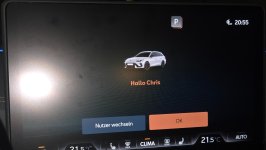
@cappuccino Do you no longer have to press "ok" or something when switching on the ignition?

I am always greeted with my profile, but I can still press "Cancel/OK" – if that could be removed, that would be good.
 
Me too – "Guest" is always present anyway...
And I am the main user.
 
So if automatic key assignment is enabled, opening a vehicle with the desired key, selecting the user profile, and then locking the vehicle again should be sufficient for the key to be assigned. Next time, this profile should start automatically. Have a look in the user Manual*; it might be described there. If the key is correctly assigned to the user, you can also save all settings as mentioned at the beginning.

As I said, the synchronization with the online data takes a bit of time, so it’s difficult to test this immediately.
 
@cappuccino I mean the screen I attached...

Now I have linked the seat setting with the key and this display no longer appeared after several attempts (ignition off, car locked – car unlocked again, ignition on,...) – I will test it again tomorrow.

P.S.: sorry for the flash – I forgot to deactivate it and afterwards I couldn’t take a new one because this display no longer appeared. 😅
 

Attachments

  • 20250927_205529.jpg
    20250927_205529.jpg
    278.2 KB · Views: 30
That should then work automatically.

According to the user Manual*, all saved settings should normally also be automatically assigned and saved to the logged-in user account and the Connect account, as well as the respective key. Why you can still save this via other methods, no idea :-) You won’t find anything about that in the user Manual* either. The globe icon is white, or is your car in online mode?
 
It seems that the connection of the seating position with the key was the last piece of the puzzle for me that was missing - I'm curious.

Thank you very much. (y)

Edit: the screen just came back - but it felt like it went away faster.
 
Last edited:
As I said, with older models, this was done by pressing the unlock button on the key. It does have some effect on the newer models as well, since the confirmation tone sounds.

I often had the problem with my car that the right mirror no longer moved to the correct position as soon as I unlocked the car. After recalling memory position 1 and pressing unlock on the key, everything worked again.
 
@cappuccino So you no longer see this login screen at all?
 
But I still see it the same way, although I only have the one profile plus guest.

If your second profile is correctly set up and the second key is assigned, which normally happens automatically, then when unlocking the vehicle, User2 should be displayed and all custom settings like climate, seats, and mirrors should be applied.
 
@Angefixt , with my facelift Leon ST the login screen closes after a few seconds without pressing OK. It will login the last user. With the login screen you can switch the user.
The behavior is working fine.
 

* = Advertisement
Links marked with an asterisk (*) are affiliate links. If you click on one of these links and make a purchase, we receive a commission from the respective online shop or provider. This does not affect the price you pay.

Back
Top