Heimautomation

Foxy

Kennt sich aus ★
Hi,
I enjoy dealing with the topic of home automation.

Since the Cupra also has a Wi-Fi client to be integrated into the home WLAN, I wanted to check in with anyone who uses something like Node-RED or Home Assistant to read data from the car or to capture charging levels and other operating parameters.

Personally, I don't use Home Assistant, but Node-RED, and I'm curious about what can be read from the car to possibly process/display it further.

Personally, I have a large display in my kitchen cabinet and would love to read and display certain parameters via MQTT there.

Looking forward to your exchange.
 
Hallo Foxy,

schau mal hier:

PyCupra kannst Du sicher auch direkt mit NodeRed verbinden, ohne den Umweg über HomeAssistant:
 
Hi Milan,

Ja Potzblitz! Was soll ich sagen, genau das was ich Suche....!!!

Hast du das in Node-Red schon mal implemetiert. Da ich kein HA nutze wäre das bomfozionös!

Muss ich mich gleich mal einlesen, kenn mich mit Pyhton jetzt so gar net aus....

Wäre cool einen Node-Red- Flow zu haben dan ich importieren könnte.

Liebe Grüße

Foxy
 
Ah ok.. ;-)

1. Wie machst du das ganze ?

2. Lese mich schon ein, is jetzt auch net so schwer. Hab im Hintergrund aber auch noch jemand der mich unterstützen kann.
 
Ja, das ist schön, Aber ich will das in Node-Red machen, da schlanker und schneller und net so viel Overhead.

Ne Anleitung* dafür zu schreiben, das andere User das auch einfach nutzen können ist auch net so das Problem.

Muss mich da erst mal selbst reinarbeiten, hab noch nie was mit Python gemacht... Kann ja aber net soo schwer sein...
 
OK nach ewigem Updaten des Raspi5, neuer Pythoninstallation usw. hab ich es jetzt geschafft das Fahrzeug abzufragen und es hat auch geklappt. :)

Das schwierigste ist also schonmal erledigt.

Jetzt muss ich mal gucken wie ich das in Node-Red verwurstel und ne partikabele Anleitung* schreibe, das es auch so Linux/Raspi-Newbies wie ich in einem halben Jahr nochmal installiert bekomme :-)
 
Es schaut schonmal ganz gut aus......

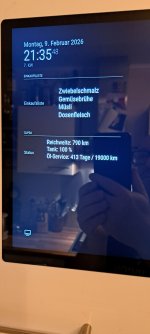
Reichweite, Ölwechselintervalle usw.... auslesen funktioniert schon mal.... Ob das wirklich die Batterie oder der Tankfüllstand oder irged was anders, ist konnte ich noch nicht rausfinden ;-)

Also das Grundgerüst steht, muss jetzt nur noch alles etwas verarbeitet werden.

Vermutlich schicke ich es über MQTT an mein Display in der Küche, so das ich die Werte immer im Blick habe....

Zwischenablage_02-03-2026_01.jpg
 
So today I've been tinkering some more:

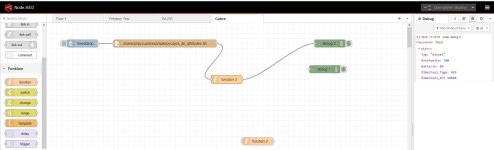
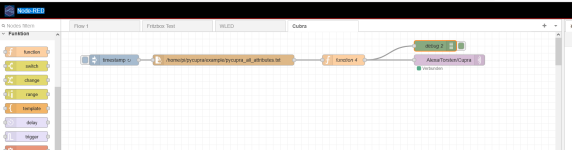
Node-Red import from text file -> filtering the results -> output to HTML -> via MQTT to my kitchen display -> MQTT module in MagicMirror -> display

To import the flow into Node-Red, please rename the .txt file to .json.

If you have any suggestions or ideas for improving the flow, feel free to share them.
 

Attachments

  • Unbenannt.PNG
    Unbenannt.PNG
    42.2 KB · Views: 29
  • 20260209_213548.jpg
    20260209_213548.jpg
    724.4 KB · Views: 29
  • Cupra.txt
    Cupra.txt
    4.6 KB · Views: 6
Last edited:
Die Einkaufsliste bringt mich zum Schmunzeln (y):cool:;)
 
Hat ziemlich Lange gedauert bis ich das zusammen gestrickt hatte.

Ich sag der Alexa: "Bitte Milch auf die Einkaufsliste" und schwups hab ich das in der Alexa-App und auf dem Display.
Hat mich nälich imemr genervt in der App nachzugucken was schon auf der Liste ist und was nicht.

Falls es wen intressiert:

 
Hello everybody

I have now sat down and written the first part of the guide on how to query vehicle data.

Everything works wonderfully for me.

How I then process all of this with Node-Red, and how it is also time-controlled, I would address in part 2.

For everyone who is already interested and would of course like to provide feedback:

 
Last edited:
Hello Hello, wenn das Script jemand benutzt, könnte ich mal eine pycupra_all_attributes.txt von einem Hypriden gebrauchen, um mal sowas wie Ladestände von Batterien usw. abzufragen und mir das mal anzuschauen.
 
Hello,

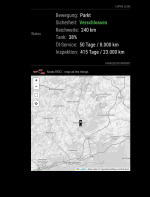
ich hab das Node-Red Paket jetzt mal noch um den Fahrzeugstandort mit einer Openstreetmap erweitert:

So schaut das ganze jetzt in meinem Küchendisplay aus:

Unbenannt1.PNG

Falls wer Hilfe benötigt sowas für sich zuhause auch zu bauen, soll mir grad Bescheid geben.

Gerne auch weitere Ideen was noch sinnvoll wäre zum Anzeigen.
 
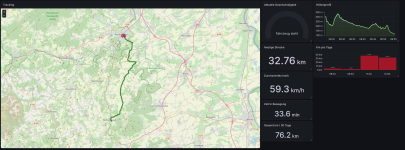
Hi, ich wollte mich mal kurz melden und berichten das es etwas eskaliert ist mit dem Fahrzeugtracking:

Da der Cupra ja nur Standortdaten sendet wenn er steht, hab ich mit einer Handy-App etwas nachgeholfen.

Diese sendet an einen Cloudserver per MQTT die Position und Zusatzdaten, dort wird es via Node-Red verarbeitet und in einer PostgreSQL Datenbank gespichert und über Grafana visualisiert. Wenn ich möchte sogar auf einer Homepage weltweit publiziert.

Das ganze ist nicht an ein Auto gekoppelt, grundsätzlich funktioniert das mit allem was GPS-Daten per MQTT sendet.

Hat Spaß gemacht das ganze aufzubauen.

Wer Infos darüber möchte, gern per PM.


Screenshot 2026-03-12 170048.png
 
What I have currently implemented for myself, for example – even though it’s with the overloaded, slow, and heavily overhead-laden HomeAssistant...

...I mostly refuel at the same petrol station and have integrated their fuel prices. As soon as the tank level increases (with certain thresholds), a refuelling event is automatically assumed, the amount refuelled is calculated/estimated, charged at the current fuel price at the petrol station, and everything is packaged together with the mileage into a calendar entry and saved. Additionally, the whole thing is automatically sent via API to spritmonitor.de.
 
Well then, you have an automatic fuel logbook. Cool idea.
The information in the app is enough for me.

Of course, it’s also quite nice to be able to see exactly how much it has cost you over the year.

For me, the data for the display are the "live data" without anything being stored in a database, which would be much more sensible for a logbook in order to get a proper evaluation.
 

* = Advertisement
Links marked with an asterisk (*) are affiliate links. If you click on one of these links and make a purchase, we receive a commission from the respective online shop or provider. This does not affect the price you pay.

Back
Top