Troubleshooting Full Link / Android Auto Wireless

Hopefully, I just ordered an iPhone 16 Pro. If anyone is interested in a Samsung S25 Ultra, feel free to reach out. 😅 😅
 
Last edited by a moderator:
I drive a Leon ST from 2025. I have a Xiaomi 15 and I keep experiencing this issue. With the Xiaomi 13 Pro, which I had before, there were no such problems. However, what always helps me is restarting the infotainment system and the smartphone. After that, the connection always works. But it's still annoying.
 
@Tygulav Check if the Wi-Fi of the Cupra is saved on your phone and remove it from the list - that helped me a lot. 👍

After testing for just over a week now, I unfortunately still have to report that it does not work properly. It still happens that the device does not connect. I must also say that the infotainment of the VZ 325 is slower to boot up than in my PHEV. :ROFLMAO:
 
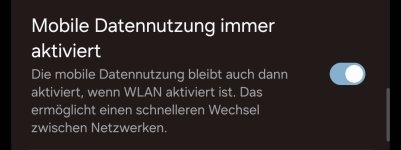
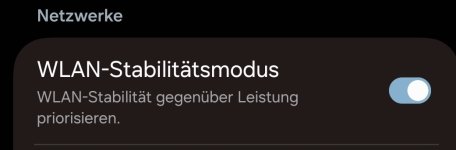
1000113708.jpg1000113732.jpg
The two settings were added to Android with the latest update - the first should make a significant contribution to solving the problem... 🙏

And the Wi-Fi stability mode even increases the performance at my home setup (from 90-110 Mbit/s to 190 Mbit/s in download).

I will report back.
 
Unfortunately, the developer settings mentioned above do not bring any further improvement.

The error still occurs from time to time. 🥴

(A "normal" S25 is being used - I think a newer model is needed 😅👌)
 
I'm still using the S21 Ultra and have never had a problem. However, since it's slowly becoming weak, I will probably have to switch to the S27 Ultra in the spring. Hopefully, by then the issues with the S25/26 will be resolved and it's not actually the Terramar that's the problem.
 
Hello!

Interestingly, there were updates for Google Maps and Waze - since then, I haven't encountered the "Full Link error" even once. *knock on wood*

Even after absolute preference situations, where the error occurred (less than 20 minutes between turning off and driving away - with and without the phone remaining in the car), nothing has happened so far.

However, it can now happen that the navigation app in Android Auto is displayed without the appropriate symbol for precise location determination (arrow, etc.) - which appears after a few minutes, though.

So it seems that the problem was related to localization.
 
Last edited:

* = Advertisement
Links marked with an asterisk (*) are affiliate links. If you click on one of these links and make a purchase, we receive a commission from the respective online shop or provider. This does not affect the price you pay.

Back
Top