Navigation
Install the app
How to install the app on iOS
Follow along with the video below to see how to install our site as a web app on your home screen.
Note: This feature may not be available in some browsers.
More options
Style variation

You are using an out of date browser. It may not display this or other websites correctly.
You should upgrade or use an alternative browser.
You should upgrade or use an alternative browser.
Troubleshooting Full Link / Android Auto Wireless
- Thread starter jv.bw
- Start date

Tygulav
Stammuser ★★
I'll try decoupling it again. I've already emptied the cache a few times (after you mentioned it a while ago). Unfortunately, that never helped. 

Angefixt
Forenfan ★★★
I'm keeping my fingers crossed for you. 
Just to be sure: disconnect, delete the Android Auto app, reinstall it, and then pair it with the car again.
Just to be sure: disconnect, delete the Android Auto app, reinstall it, and then pair it with the car again.
Angefixt
Forenfan ★★★
Tygulav
Stammuser ★★
Sorry for the late reply, I only got around to performing the reset a few days ago. Unfortunately, it didn't help. Today it still didn't connect again.

Invio1
Forenfan ★★★

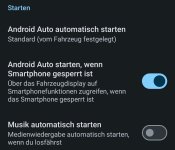
It has always been set to "Standard" and without automatic music playback for me, and it has never caused any problems, neither with Cupra nor with other brands. However, I still have the Galaxy S23. Perhaps something has been made worse, perhaps due to new AI features that mine does not have yet. Maybe try turning those off or just play around with the AA settings and see if it gets better.
Angefixt
Forenfan ★★★
I have only encountered the "Full Link" error twice in the 10 days since I made the changes in Android Auto, and both times I only had to restart the infotainment once.
That's nothing compared to before.
Back then, it often didn't work well 2-3 times in a row during the restart.
From my side, I can only say:
For the Leon Sportstourer VZ model year 2026, with my software version, the settings work with a Samsung S25.
That's nothing compared to before.
Back then, it often didn't work well 2-3 times in a row during the restart.
From my side, I can only say:
For the Leon Sportstourer VZ model year 2026, with my software version, the settings work with a Samsung S25.
Angefixt
Forenfan ★★★
@Tygulav I completely forgot that I had already made an adjustment in the settings of the phone itself in the past...
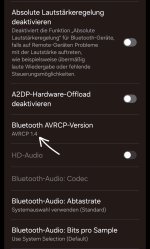
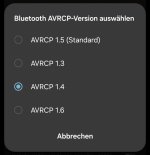
Check the Bluetooth version used in your phone's settings.
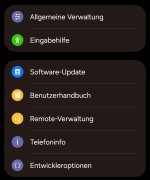
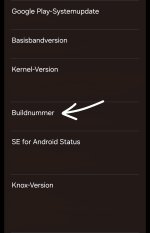
I have attached pictures for the instructions.
You activate the menu by proceeding as follows:
Settings > Phone info > Software information > Build number (tap 10 times and enter your PIN).
After that:
Settings > Developer options > Bluetooth AVRCP version (set to 1.4)
The default version (1.6) causes problems - in connection with later connecting the phone to the infotainment through the Android Auto settings, your problem should also be resolved.
Attachments
Tygulav
Stammuser ★★
Thank you, I will try that. I picked up my VZ 325 yesterday and it has been causing even more problems with my S25 than my eHybrid.
@Invio1 The problem, as far as I know, only exists with the S25. My Huawei P30 Pro (unfortunately deceased ) and Poco X17 Pro never had a single issue with AA in the Leon.
@Invio1 The problem, as far as I know, only exists with the S25. My Huawei P30 Pro (unfortunately deceased
) and Poco X17 Pro never had a single issue with AA in the Leon.
Angefixt
Forenfan ★★★
Very cool!I picked up my VZ 325 yesterday
Congratulations and safe travels.

Then I recommend that you disconnect your phone again, adopt the settings in Android Auto ("Standard" and disable automatic media playback), clear the cache of Android Auto, then change the Bluetooth AVRCP version to 1.6/1.4, afterwards restart the phone (not just turn it off, but really choose "Restart") and then connect it to the car.
That will work...
Last edited:
Angefixt
Forenfan ★★★
@Tygulav I set the Bluetooth AVRCP version back to 1.6 for testing purposes...
What can I say: I started the car four times - three times there was immediately the "Full Link" error and the second time it only worked after the third restart. Catastrophe
I will definitely change it back to 1.4!
What can I say: I started the car four times - three times there was immediately the "Full Link" error and the second time it only worked after the third restart. Catastrophe
I will definitely change it back to 1.4!
Last edited:
Terramarflieger
War schon mal da
I have the same problem, Terramar Hybrid, current vehicle software, Samsung S25 Ultra. For me, the best solution is to close all open apps on my phone before getting in; then the connection works.

I have the same issue with my S25 Ultra and Cupra Formentor eHybrid. It often works, but especially when I'm in a hurry, it acts up. The big software update didn't change anything. What I've also found out is that when I have a VPN connection activated on my S25, it doesn't work at all anymore. Turning the infotainment off and on helps (unfortunately, only most of the time). It seems to be a problem with the platform. Since it's widespread across the entire company, I'm surprised that nothing is being done about it.
HavannaHighline
Kennt sich aus ★
I have now turned off the automatic music starting for a week, and since then I've only had the problem once. Samsung S25 Ultra and 2024 Golf GTI. It's still just annoying, and I have no hope that it will be better with the Cupra.

Grafreini
Kennt sich aus ★
How does the S26 ultra behave  Are there the same problems with it as with the S25 ultra . My S21 ultra is slowly giving up the ghost

Are there the same problems with it as with the S25 ultra . My S21 ultra is slowly giving up the ghost
Angefixt
Forenfan ★★★
@Grafreini My wife's S26 works flawlessly - it really seems to only affect the 25 series...
That's how you sell new phones to people.
That's how you sell new phones to people.
HavannaHighline
Kennt sich aus ★
Just another question, does anyone know about connection issues with iPhone/Apple Car Play? I'm thinking about switching to an iPhone

Similar threads

F
- Replies
- 9
- Views
- 4K


* = Advertisement
Links marked with an asterisk (*) are affiliate links. If you click on one of these links and make a purchase, we receive a commission from the respective online shop or provider. This does not affect the price you pay.