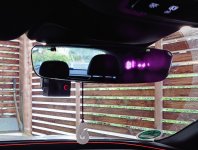
100% correctly identified. From the driver's seat, almost only the inner lens of the front camera is visible. The cable runs behind the mirror and is also in the shadow of the cover on the side.
The one for the rear camera is a bit more present in the rearview mirror, but the camera is also visible there.
And yes. The USB ports are only for power. The connection is at the front in the fuse box with the OBD power adapter from Garmin. From there, it goes with 2x USB-A to a 2-wire cable, to the interior mirror and into the tailgate and then to USB-C sockets.
The cameras are from Garmin and each is independent. The videos are then merged in an app and can be exported as PIP if desired.
Or you can remove the memory card.
The command to save goes via voice command ("OK Garmin - Save Video") or automatic event detection. Without a save command, it will continuously delete.
If I wanted to remove the cams, only a small metal plate (magnetic holder) would remain on the windshield and a small plastic knob at the back. The size is just right to fit between two heating wires.
Reinstallation when selling is also possible; then only the adhesive plate would need to be removed from the windshield. The USBs could remain, or you could provide new covers (12,- for the front, 42,- for the back).
The one for the rear camera is a bit more present in the rearview mirror, but the camera is also visible there.
And yes. The USB ports are only for power. The connection is at the front in the fuse box with the OBD power adapter from Garmin. From there, it goes with 2x USB-A to a 2-wire cable, to the interior mirror and into the tailgate and then to USB-C sockets.
The cameras are from Garmin and each is independent. The videos are then merged in an app and can be exported as PIP if desired.
Or you can remove the memory card.
The command to save goes via voice command ("OK Garmin - Save Video") or automatic event detection. Without a save command, it will continuously delete.
If I wanted to remove the cams, only a small metal plate (magnetic holder) would remain on the windshield and a small plastic knob at the back. The size is just right to fit between two heating wires.
Reinstallation when selling is also possible; then only the adhesive plate would need to be removed from the windshield. The USBs could remain, or you could provide new covers (12,- for the front, 42,- for the back).