
Navigation
Install the app
How to install the app on iOS
Follow along with the video below to see how to install our site as a web app on your home screen.
Note: This feature may not be available in some browsers.
More options
Style variation

You are using an out of date browser. It may not display this or other websites correctly.
You should upgrade or use an alternative browser.
You should upgrade or use an alternative browser.
Remote unlocking and locking via the MyCUPRA app
- Thread starter Jürgen
- Start date
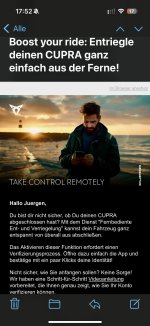


Du musst dich vorher verifizieren. Einfach mal in deiner Cupra Garage des Vertrauens anhalten.
Jürgen
Ist öfter hier
Ich bin registriert, alle übrigen Funktionen können auch genutzt werden.
Registrierung und Verifizierung sind 2 unterschiedliche Dinge. Letzteres geht nur beim Händler vor Ort oder online mit Perso.
Jürgen
Ist öfter hier
Ok, verstehe ich, aber die App bietet mir an keiner Stelle die Möglichkeit, mich mit dem Perso zu verifizieren 

So when I picked up the car at my dealer, I verified myself as the main user with my ID for exactly that function, in other words, exactly like @ekm who wrote it, you can best do that at your dealer. It may then take a few hours until the function is activated for you.
I don't think it's possible to do that in the app.
The easiest way is to do it quickly at the dealer
Best regards
I don't think it's possible to do that in the app.
The easiest way is to do it quickly at the dealer
Best regards
Jürgen
Ist öfter hier
Thank you for your feedback.
When setting up the app, my friendly Cupra dealer assisted me at the time of vehicle collection. I was registered as the main user, and there are no additional users.
As already mentioned, all other functions that the app offers are also active. So the fact that only this function is missing does make me suspicious.
Furthermore, the email mentioned at the beginning includes a short video clip explaining the setup via the app.
But as I have already stated, this verification is not possible for me.
ok, a different question: what does the globe icon in the vehicle show you? Maybe you don’t have the mode enabled where no one can access your vehicle?
No idea what it’s called xD, but when I took delivery, not everything was allowed yet. If you grant full access to the service and so on, it might work?
So if everything is allowed, the globe is white; otherwise, there is a mode where only limited access is allowed or everything is blocked.
No idea what it’s called xD, but when I took delivery, not everything was allowed yet. If you grant full access to the service and so on, it might work?
So if everything is allowed, the globe is white; otherwise, there is a mode where only limited access is allowed or everything is blocked.
Jürgen
Ist öfter hier
Uh, globe, I think I’m a bit slow on the uptake right now
I do have a small globe icon at the top right of the infotainment display… but nothing can be accessed or opened from it.
As far as my user settings go, everything is actually activated
I do have a small globe icon at the top right of the infotainment display… but nothing can be accessed or opened from it.
As far as my user settings go, everything is actually activated
Jürgen
Ist öfter hier

Privacy settings are also correctly configured? So next to the white globe, there is a head with the location symbol to the right of it.
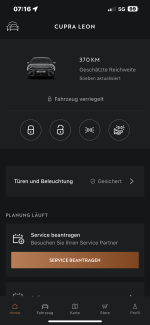
That is normal, although this setting is disabled for me, the display at the bottom is always there for me as well.Oh, and when I try to access the vehicle settings in the app, this appears….
Jürgen
Ist öfter hier
Hm, echt verflixt ….zumal ja alle anderen Funktionen vorhanden sind.
Die beiden Buttons für Licht/Hupe und Blinker sind ja da?
….zumal ja alle anderen Funktionen vorhanden sind.Die beiden Buttons für Licht/Hupe und Blinker sind ja da?
hm, also am besten mal beim Freundlichen erklären lassen 
Jürgen
Ist öfter hier

Oha, gilt vielleicht nur für die Erstanmeldung (Identifikation). Ich kann die Funktion sowohl vor als nach dem Update nutzen.
Similar threads
- Replies
- 10
- Views
- 3K


* = Advertisement
Links marked with an asterisk (*) are affiliate links. If you click on one of these links and make a purchase, we receive a commission from the respective online shop or provider. This does not affect the price you pay.